


When you open a website an notice a padlock next to its address, it's more than a comfort symbol – it's a guarantee that your data is encrypted, authenticated, and protected.
This invisible shield is made possibly by SSL/TLS, the protocol that secure the modern web.
Let's dive deep into how SSL/TLS works, why it's crucial, and what actually happens when you visit a secure website.
Current Flow of HTTP
What Is HTTP?
HTTP (Hyper Text Transfer Protocol) is the foundation of data communication on the web.
It defines how a browser (client) and a web server communicate – sending requests and receiving responses.
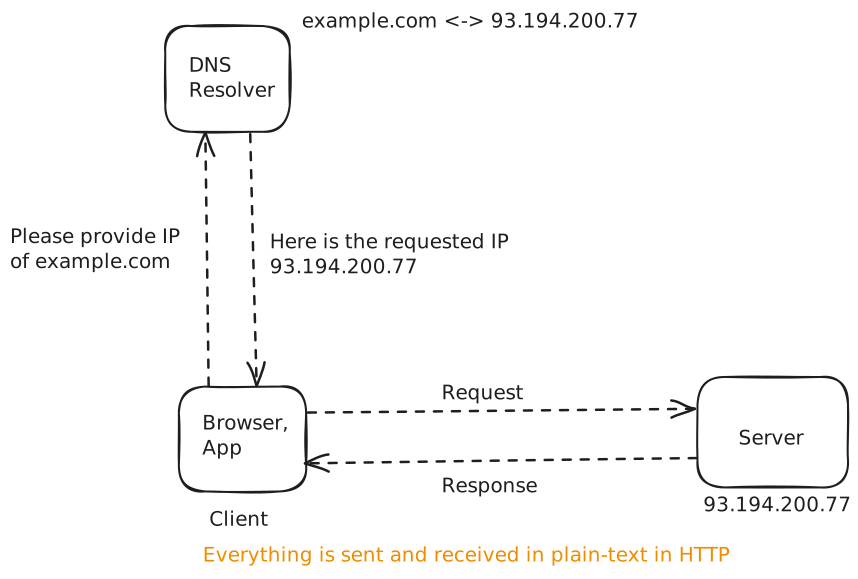
Example Flow: HTTP Request-Response
Let's say you visit:
https://example.comHere's what happens step-by-step:
1 DNS Resolution
- Browser asks DNS: “What is the IP of example.com?”
- DNS replies: “It's
93.194.200.77”
2 TCP Connection
- Browser opens a TCP connection to the server's IP at port
80(default HTTP port).
3 HTTP Request Sent
Browser sends a plaintext message:
GET /login HTTP/1.1
Host: example.com
User-Agent: Chrome
Cookie: session=123abc
Everything here – including cookies, headers, and possibly passwords in POST data – is sent in plain text.
4 Server Response
Server replies:
HTTP/1.1 200 OK
Content-Type: text/html
Content-Length: 5423
followed by the webpage content (HTML, CSS, JS, etc.)
5 Browser Renders Page
- The connection may stay open (persistent TCP) for more requests.
Problem: It's All Plain Text
HTTP by itself does not encrypt anything.
That means anyone between you and the server (like ISPs, public Wi-Fi routers, or attackers) can:
- Read everything (passwords, cookies, tokens)
- Modify data in transit (inject malware or fake content)
- Impersonate the server (man-in-the-middle attacks)
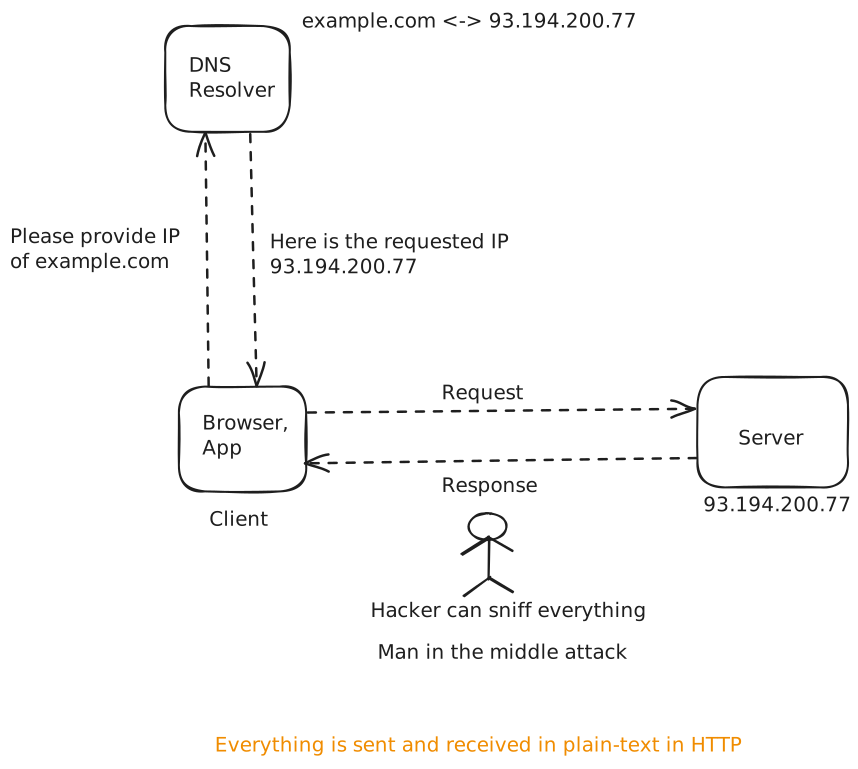
So, while HTTP defines how to communicate, it doesn't ensure secure communication.
The 3 Main Security Problems with HTTP
| Problem | Description | Example |
|---|---|---|
| 1. No Encryption | Data is readable in transit | Passwords or credit card numbers visible |
| 2. No Integrity | Data can be changed before reaching destination | Hacker injects malicious script |
| 3. No Authentication | No guarantee you’re talking to the real server | Fake “login.google.com” site |
The Need for SSL/TLS
To fix these vulnerabilities, the web needed a security layer – something that could:
- Encrypt communication
- Verify identity of servers
- Prevent tampering
That's where SSL (Secure Sockets Layer) and its successor TLS (Transport Layer Security) come in.
SSL/TLS doesn't replace HTTP. It just wraps around it to make it secure.
That's why you see:
HTTPS = HTTP + SSL/TLSFirst Principle Thinking
The first thing that comes in our mind is to secure the channel.
In order to do we think of encryption. But how.
For encryption we would need a key that encrypts the data as well as decrypts it. This is known as the symmetric encryption.
Suppose client generates a key and want to send the encrypted request.
Symmetric Encryption:
Step 1:
Client generates the key, encryptes the request data with it and sends the request.
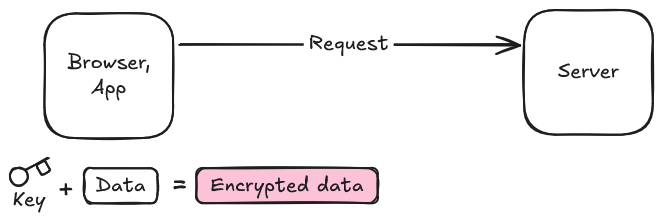
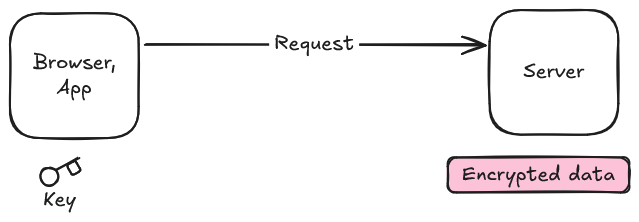
Step 2:
Server receives the encrypted data. Now comes the twist. Can the server reads and parse the data. No it can't without the key which it doesn't have. Only client have it.
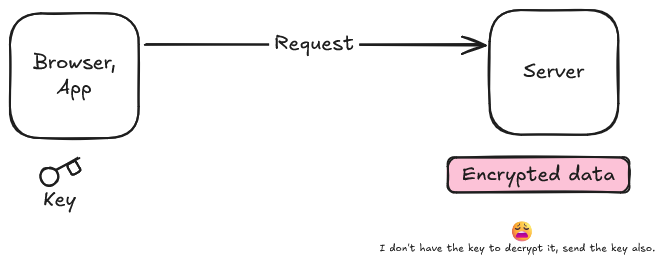
Somehow we have to transfer the key to server.
Now we could think of sending this key as it as to the server.
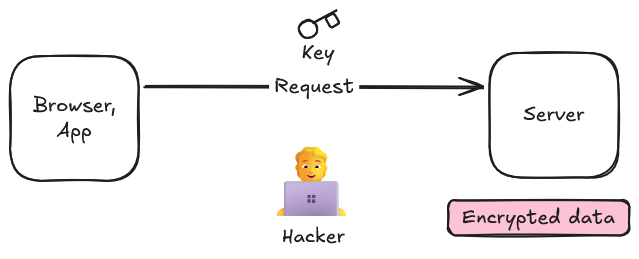
But any person in between the client and server can access it. The hacker can keep the copy of the key and whatever we communicate in the subsequent request hacker can decrypt complete traffic.
So this approach would not work.
Asymmetric Encryption:
Now we think something better, what if we have two keys one the client keep while the other is for the server. This is the place where asymmetric encryption comes into play.
In asymmetric encryption we have two keys: one is pubic key while the other is the private key.
Public key -> Encryption
Private key -> Decryption
Encrypt with public key -> Decrypt with corresponding private key.
However, it can also be used for digital signatures, where the roles are conceptually reversed:
Sign with private key -> Verify with public key
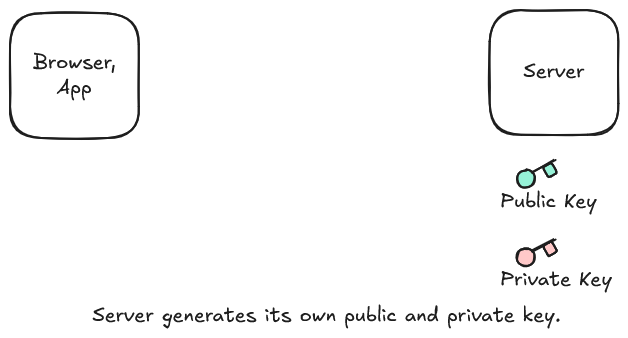
Step 1:
Server generates its public and private key. Then sends its public key to the client.
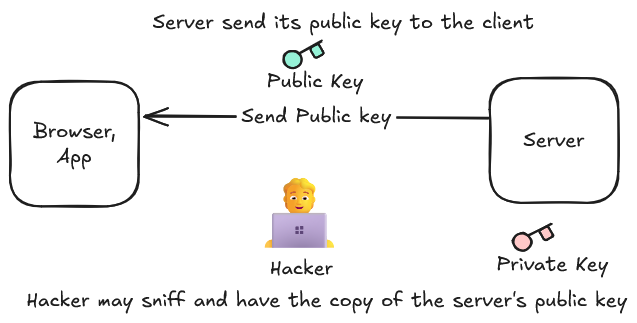
Step 2:
Client receives the server's public key. Then generates the symmetric key and encrypts it using the server's public key.
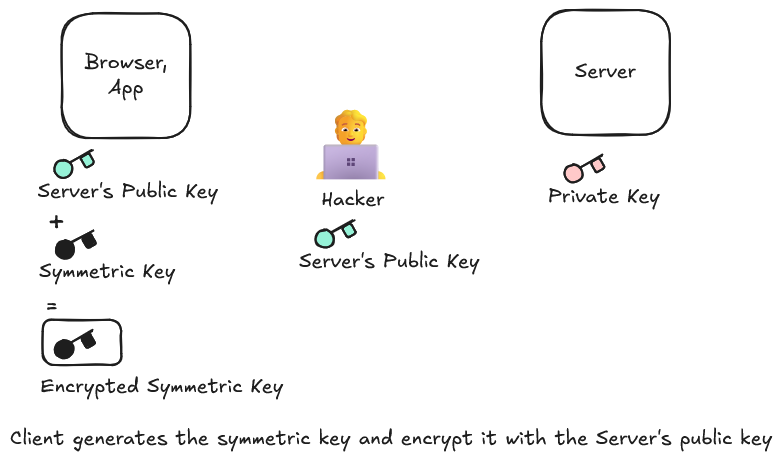
Step 3:
The client sends the encrypted symmetric key to the server. The hacker may still sniff it, however it would be useless for it. As it can only be decrypted with the corresponding server's private key. Hacker only have the copy of the server's public key. Server decrypts the key using the private key.
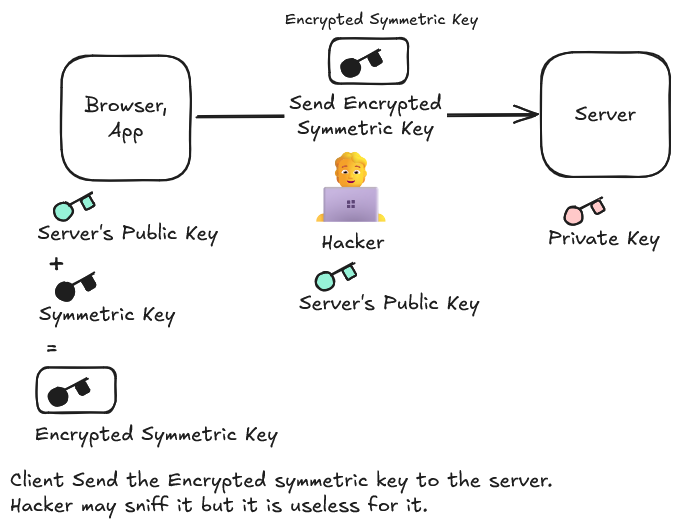
Step 4:
Now both the client and server have the same symmetric key.
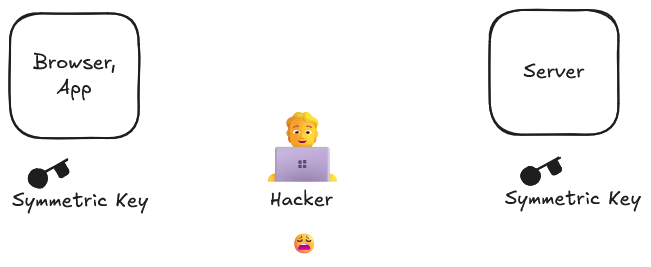
Step 5:
Now for all the subsequent requests client would encrypt the data with the symmetric key and transfer the encrypted data to the server. Server on receiving it decrypts the data with the symmetric key that it have. Thus we secured the channel.
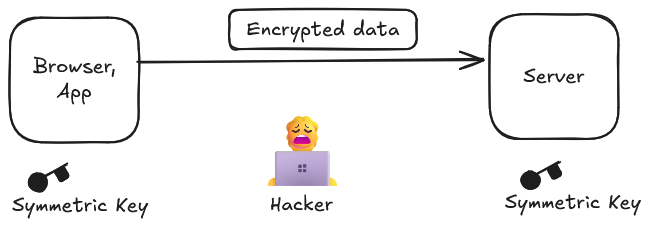
Have we become un-hackable now!!!!
No. Still there is a flaw in this approach.
Flaw: MITM (Man In The Middle Attack)
Hacker could acts as the proxy.
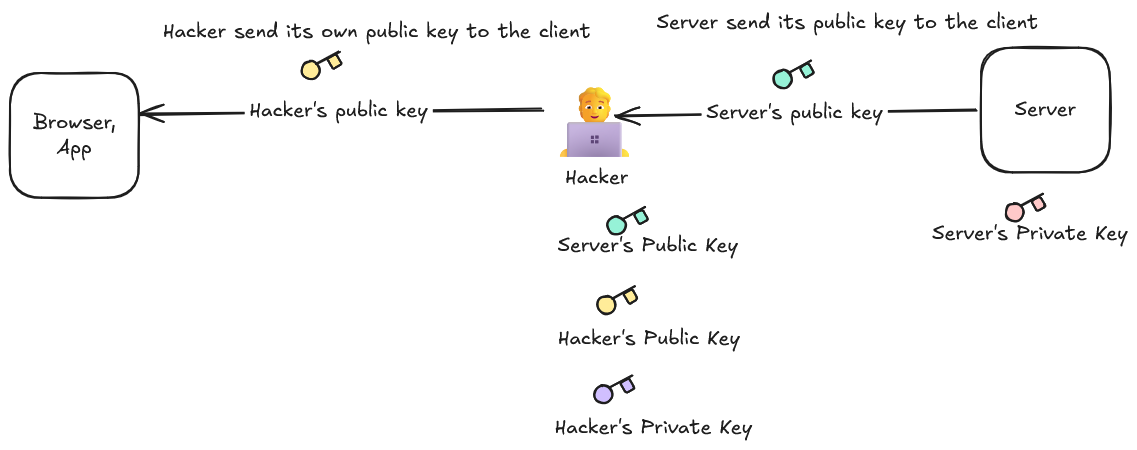
When server sends its public key to the client. The hacker can act as the proxy intercepting all the traffic. It act as the client for the server.
Step 1:
Server generates its public and private key and send the public key to the client.
Hacker intercepts the traffic. Takes the server's public key keep it. Generates its own public key and private key. Send its own public key to the real client.
Step 2:
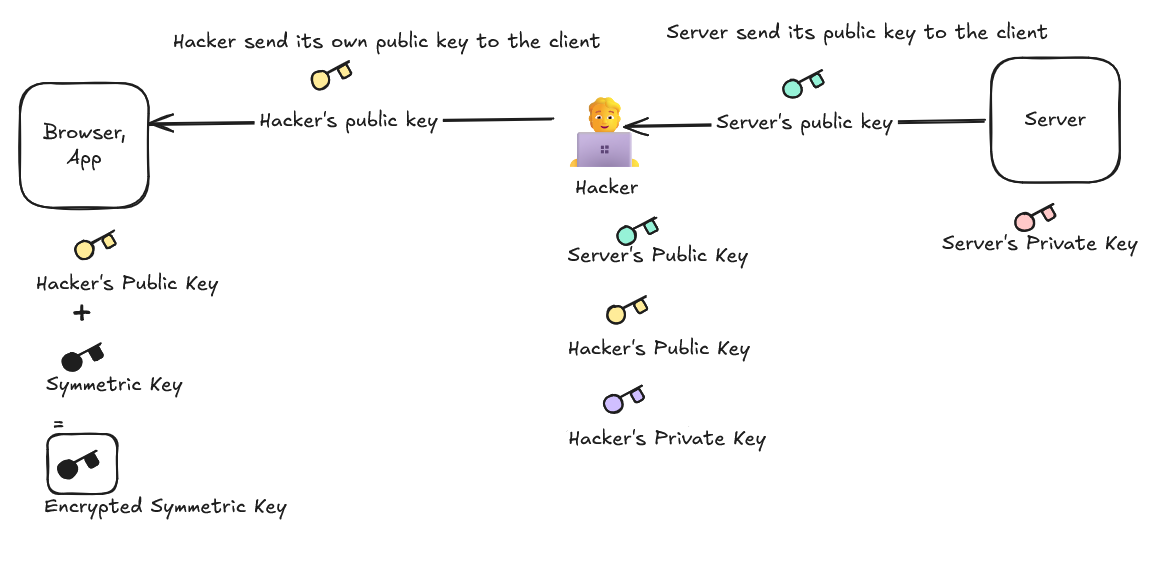
After receiving the hacker's public key. The client generates the symmetric key. Encrypts it with the hacker's public key.
Step 3:
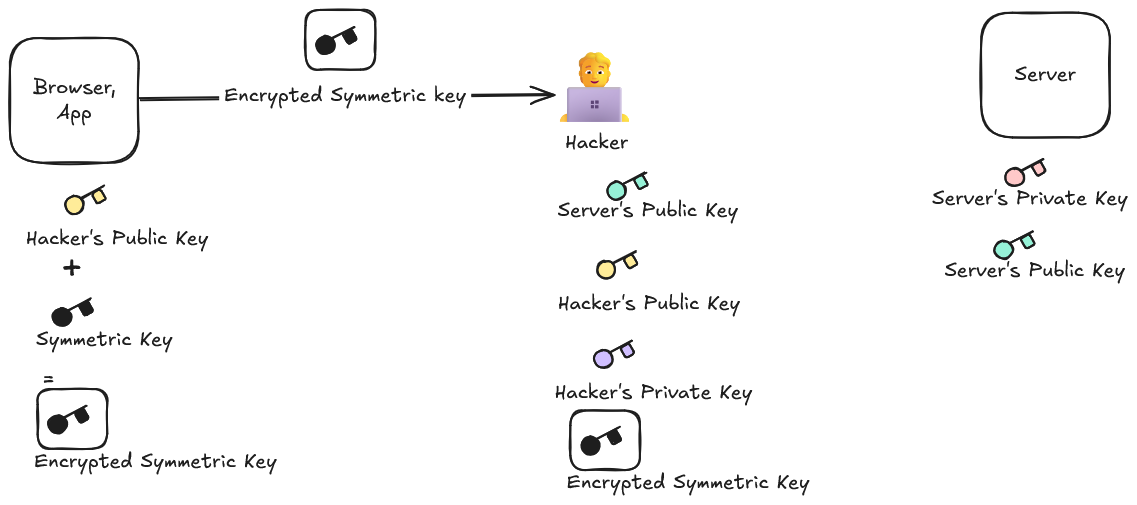
Now the Client sends the Encrypted symmetric key to the server thinking of the server.
Step 4:
The Hacker now receives the encrypted symmetric key stores it. Decrypts it using its private key. Then generates a symmetric key of its own, encrypt it using the server's public key and send it to the server. The server decrypts the encrypted hacker's symmetric key with its private key.
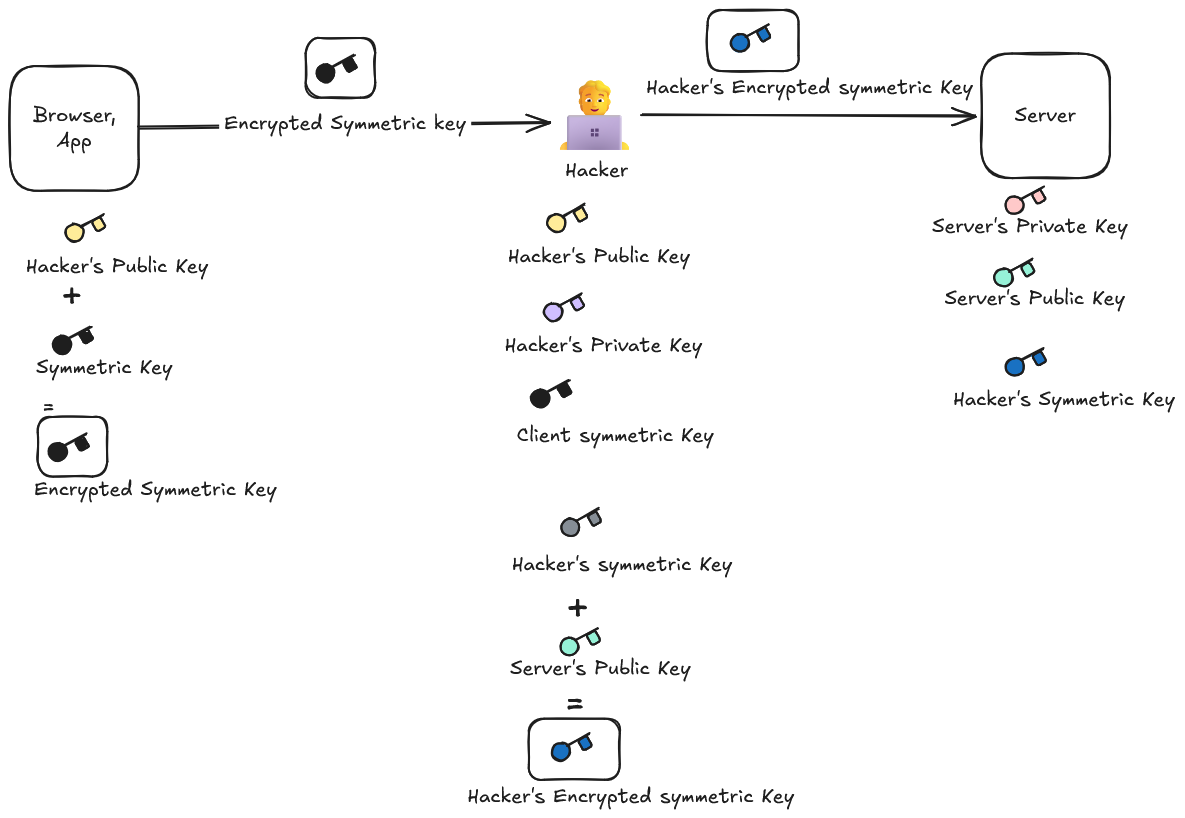
Thus for the subsequent request response client thinks it is communicating with the real server while the server thinks it is communicating with the real client. While there is proxy in between.
Can we avoid this.
Here comes the role of the SSL certificate.
Problem:
1 Man-in-the-Middle (MITM) attach:
When the real server send its public key. A MITM attacker intercepts the connection and sends the client the client its own public key instead.
2 The client cannot initially know whose public key it received:
The attacker can say, “This is the public key of example.com” Without some trusted mechanism, the client has no reliable way to verify that claim.
Solution:
Certificate Authority (CA)
A trusted third party called a Certificate Authority verifies the server's identity and issues a digital certificate containing information such as:
- The server/domain name
- The server's public key
- The certificate's validity period
- The CA's digital signature
When the client receives the certificate, it checks the CA's digital signature using the CA's trusted public key.
If the attacker replaces the real server's certificate with their own certificate, the certificate won't be valid for the legitimate domain or won't have a trusted chain of signature. The browser can therefore warn the user or terminate the connection.
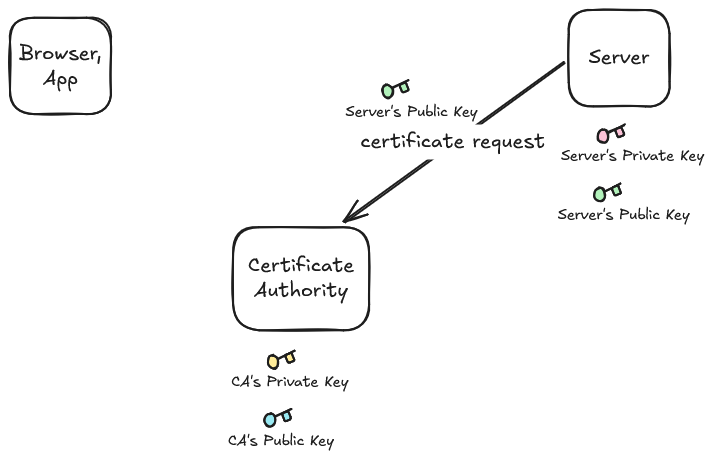
Step 1:
The day we develop the server. Our server reaches to the third parties like Let's encrypt:
- Server: Hey
Let's encrypt! Can you generate a certificate for me please. - Let's Encrypt: Sure, but I would need your public key.
Server send its public key to the CA.
Step 2: CA creates and signs the certificate
This certificate essentially says:
This public key
       ↓
belongs to
       ↓
example.com
And then CA digitally signs this certificate with its CA private key.
Certificate =
    domain name
    +
    server's public key
    +
    validity information
    +
    Let's Encrypt's digital signature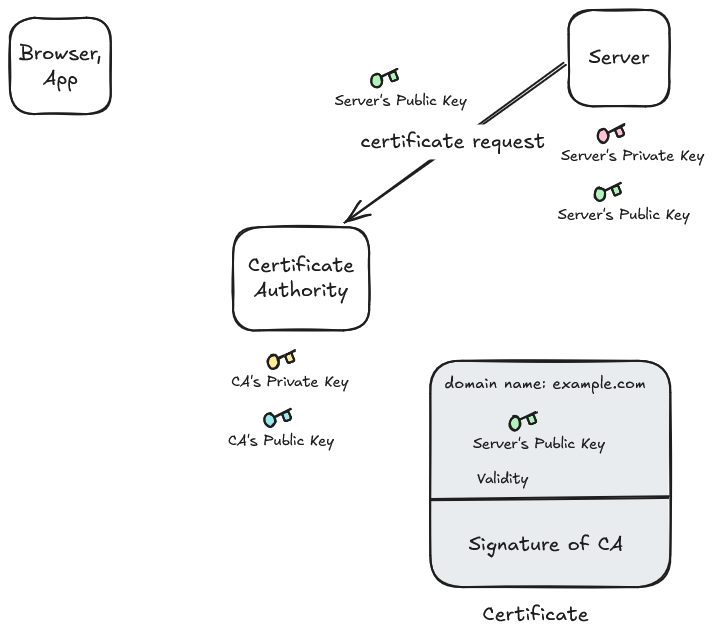
Let's say the certificate contains:
Domain: example.com
Public Key: Server's Public Key
Valid From: ...
Valid Until: ...
Issuer: Let's Encrypt
Conceptually, let's call this information:
Certificate DataThen CA hashes the certificate data:
H = SHA-256(Certificate Data)

Certificate Data
       │
       ▼
   SHA-256
       │
       ▼
   "8f3a...abc"
Now CA signs this hash with its private key.
Every CA has its own key pair:
Let's Encrypt:
	CA Public Key
	CA Private Key
The CA uses its private key to create the digital signature:
Signature = Sign(CA_Private_Key, Hash(Certificate Data))The certificate now contains something conceptually like:
Certificate
├── Domain: example.com
├── Server Public Key: PK_server
├── Validity: ...
├── Issuer: Let's Encrypt
└── CA Signature: ✍️
At last the CA send this certificate to the server where the server stores it.
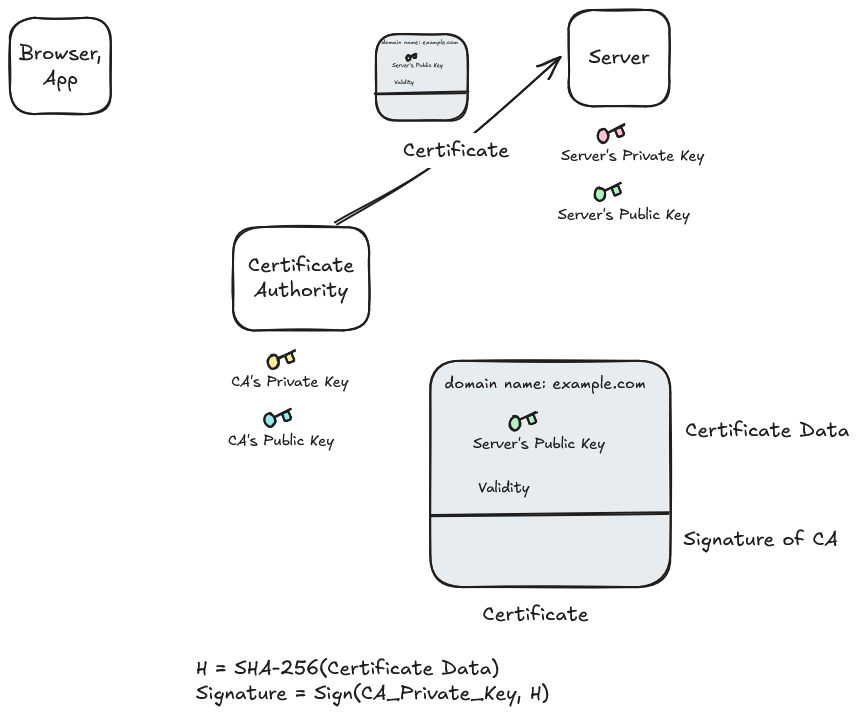
Now server has the SSL certificate.
Step 3:
Now when the client visits the server. The client starts a TLS handshake with the server.
Conceptually:
Browser                         Server
   |                               |
   |---- "I want HTTPS" ---------->|
   |                               |
The client also sends information about which TLS versions and cryptographic algorithms it supports.
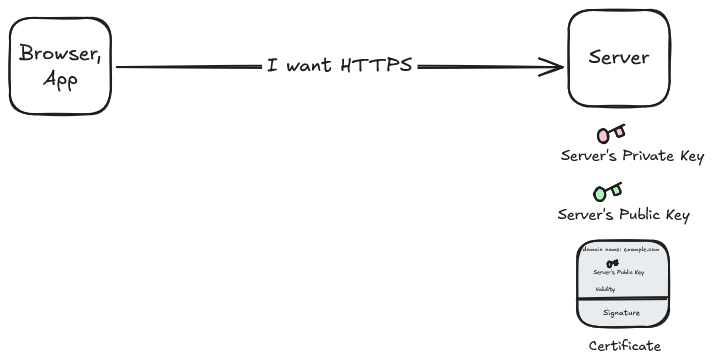
The server responds with its certificate:
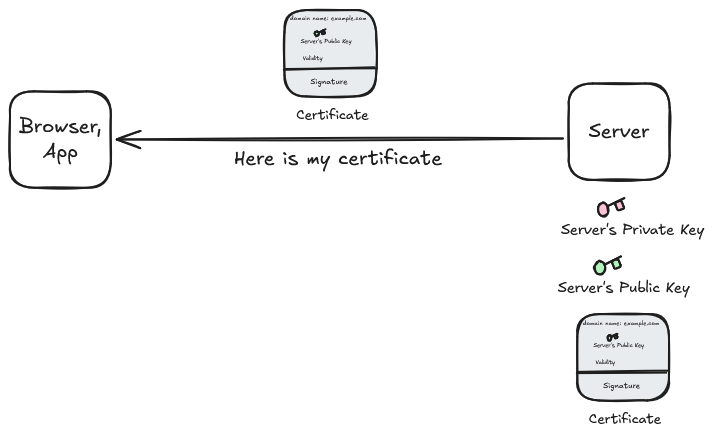
The certificate contains something like:
Domain: example.com
Server Public Key
Validity
Issued by: Let's Encrypt
CA Signature: ✍️
Client verifies the certificate:
The client now asks:
“Can I trust this certificate?”
It checks thins such as:
Is the domain correct?
        ↓
Is the certificate still valid?
        ↓
Is it issued by a trusted CA?
        ↓
Is the CA's signature valid?
        ↓
Is the certificate chain trusted?
If everything checks out:
Certificate ✅The client now has confidence that:
This public key is associated with example.com according to a trusted CA.
What Is Encryption?
Encryption is the process of converting readable data (plaintext) into unreadable data (ciphertext) so that only authorized parties can read it.
When you encrypt something, you lock it using a key – and only someone with the right key can unlock (decrypt) it.
Encryption is the science of making data useless to everyone except the intended recipient.
Simple Analogy
Imagine you write a letter and put it inside a locked box. You send that box to your friend – but only your friend has the key to open it.
Even if someone intercepts the box in transit, they can't read the letter without the key.
That's encryption in a nutshell.
Core Terms
| Term | Meaning |
|---|---|
| Plaintext | Original readable data (e.g., “hello world”) |
| Ciphertext | Encrypted, unreadable version of data |
| Encryption | Process of turning plaintext → ciphertext |
| Decryption | Process of turning ciphertext → plaintext |
| Key | Secret value used to encrypt and decrypt data |
| Algorithm (Cipher) | The mathematical formula that performs encryption |
Types of Encryption
There are two main types of encryption based on how keys are used.
1 Symmetric Encryption
- Uses the same key for both encryption and decryption.
- Fast and efficient.
- But the key must be shared securely between sender and receiver.
Example:
| Sender | Receiver |
|---|---|
| Encrypts data with 🔑 | Decrypts data with the same 🔑 |
Real-world example:
When you use TLS (after handshake) – all actual data is encrypted symmetrically using a session key.
2 Asymmetric Encryption
- Uses two different keys:
- A public key (shared with everyone)
- A private key (kept secret)
- When one key encrypts, only the other can decrypt.
Example:
| Step | Action |
|---|---|
| 1️⃣ | Server gives you its public key |
| 2️⃣ | You encrypt your message with that public key |
| 3️⃣ | Only the server (with its private key) can decrypt it |
Real-world example:
Used during SSL/TLS handshake to securely exchange the symmetric session key.
What Is SSL/TLS?
SSL (Secure Sockets Layer) and its successor TLS (Transport Layer Security) are cryptographic protocols that ensure secure communication between two systems – typically a browser (client) and a web server.
- SSL was the original version developed by Netscape in the 1990s.
- TLS is its improved, more secure version that replaced SSL (though the term “SSL” is still used informally).
Together, they provide three pillars of security.
| Goal | Meaning |
|---|---|
| 🔏 Encryption | Data transferred between client and server is unreadable to others. |
| 🧾 Integrity | Data cannot be altered during transmission. |
| 🧠 Authentication | Confirms the identity of the server (and sometimes the client). |
What Is the TLS Handshake?
The TLS handshake is the protocol phase where:
- Client and server agree on cryptographic algorithms
- Server proves its identity
- Both derive shared session keys
- Secure communication begins
After the handshake, all traffic is encrypted.
How SSL/TLS Works – The Handshake Process
When you connect to secure website (say https://example.com), your browser and the server perform a process called a TLS Handshake to establish trust and generate encryption keys.
Let's understand this step by step:
Step 1: Client Hello
Your browser sends a Client Hello message to the server, containing:
- The supported TLS version (e.g., TLS 1.2, 1.3)
- A list of cipher suites (encryption algorithms)
- A random number (used later for key generation)
“Hey server, I would like to talk securely. Here's what I can do.”
Step 2: Server Hello
The server responds with:
- Its chosen TLS version and cipher suite
- Its own random number
- Its digital certificate (issued by a trusted Certificate Authority)
The certificate includes:
- The domain name
- The server's public key
- The CA's signature
“Sure! Let's use this encryption method, and here's my identity proof.”
Step 3: Certificate Verification
Your browser now validates the certificate:
- Is it signed by a trusted by a trusted CA?
- Is it valid (not expired or revoked)?
- Does the domain match the certificate?
If everything checks out, the handshake continues.
If not, you see the dreaded:
“Your connection is not provide.”
Step 4: Key Exchange
Now, both the client and the server need to agree on a shared session key for encrypting data.
Two methods are commonly used:
A. RSA Key Exchange (Older TLS versions)
- The browser generates a pre-master secret, encrypts it using the server's public key, and sends it.
- The server decrypts it using its private key.
- Both sides then derive the same session key.
B. Diffie-Hellman (Modern TLS 1.3)
- Both sides exchange ephemeral public keys.
- Using the Diffie-Hellman algorithm, they each compute the same session key, independently.
- The session key is never transmitted – ensuring perfect secrecy.
Step 5: Session Established
Using the exchanged data, both the client and server derive identical session keys.
These keys are symmetric – used for both encryption and decryption – because symmetric encryption is much faster.
From this point, all data is securely encrypted.
Step 6: Encrypted Communication Begins
Now, every request and response (like HTTP GET or POST) is:
- Encrypted using the session key.
- Authenticated to ensure integrity.
The browser shows a padlock symbol – indicating a successful secure connection.
Step 7: Connection Termination
When the session ends:
- The session key is discarded
- A new handshake is required for a new session
TLS 1.2 Handshake (Classic Model)
Step 1 ClientHello
Client sends:
- Supported TLS versions
- Supported cipher suites
- Random values (ClientRandom)
- Supported key exchange methods
Purpose: “Here's what I support”
Step 2: ServerHello
Server responds with:
- Chosen TLS version
- Chosen cipher suite
- Random value (ServerRandom)
- Digital certificate (contains public key)
Purpose: “Here's what we will use.”
Step 3: Certificate Verification
The client:
- Verifies the certificate signature
- Validates domain name
- Checks expiration
- Verifies CA chain
Certificate authorities like:
- Let's Encrypt
- DigiCert
If verification fails -> connection stops
Step 4: Key Exchange
Depends on cipher suite.
Modern method: ECDHE (Ephemeral Diffie-Hellman)
Both sides:
- Generates temporary key pairs
- Exchange public values
- Compute shared secret
Shared secret = Session key material
Important:
The private keys are never transmitted.
Step 5: Finished Messages
Both sides send:
- Encrypted “Finished” message
- Proof they derived the same session key
If successful -> secure channel established.
TLS 1.3 Handshake (Modern Version)
Major improvements:
- Removed weak algorithms
- Enforced forward secrecy
- Faster handshake (1 round-trip)
- More encrypted handshake data
Step 1: ClientHello
Includes:
- Supported cipher suites
- Key share (ECDHE public value)
- Supported versions
Client immediately sends key exchange data.
Step 2: ServerHello
Server replies with:
- Chosen cipher
- Its key share
- Certificate
- Certificate Verify
- Finished message
From this point, most communication is encrypted.
History of SSL/TLS
Before SSL/TLS:
- the web was mostly plaintext
- passwords traveled unencrypted
- online banking was unsafe
- e-commerce was nearly impossible
SSL/TLS solved a fundamental problem:
How can two strangers communicate securely over an untrusted network?
1 Internet Before SSL (1980s – early 1990s)
Early internet protocols assumed:
- users were trusted
- networks were academic/research-oriented
Protocols like:
- HTTP
- FTP
- Telent
- SMTP
sent everything in plaintext.
Example:
LOGIN alice
PASSWORD 123456
Anyone on the network could sniff packets using:
- packet analyzers
- shared Ethernet hubs
- ISP interception
There was:
- no encryption
- no authentication
- no integrity checking
2 Birth of the Web and the Security Crisis
In 1989-1991:
- Tim Berners-Lee created:
- HTTP
- HTML
- the Web
The web grew rapidly.
Then companies wanted:
- online shopping
- online banking
- credit card payments
But there was a problem:
HTTP was completely insecure.Credit card numbers could be stolen easily.
This threatened the future of e-commerce.
3 Netscape and the Creation of SSL
In 1994:
- Netscape dominated browsers with Netscape Navigator.
Nescape engineers designed SSL.
Goal:
- secure browser-server communication
SSL introduced:
- Encryption
- Authentication
- Integrity
This was revolutionary.
4 SSL 1.0 – The Failed Beginning
SSL 1.0 was developed internally in 1994.
It was never released publicly because:
- cryptographic flaws were discovered
- handshake design weakness existed
- insufficient protection against MITM attacks
At this time:
- cryptography engineering was still immature
Many concepts:
- certificate validation
- key exchange security
- cipher negotiation
were not fully understood operationally.
So Netscape abandoned SSL 1.0.
5 SSL 2.0 (1995) – First Public Version
SSL 2.0 became the first deployed secure web protocol.
Step 1: ClientHello
Browser sends:
- SSL version
- Supported cipher suites
- Random data
Purpose:
- tell server what client supports
Step 2: ServerHello
Server responds with:
- Selected cipher suite
- Certificate
- Random data
Purpose:
- choose encryption settings
Step 3: Certificate Exchange
Server sends:
- X.509 certificate
Containing:
- public key
- server identity
- CA signature
This allowed browser to verify:
- “Am I really talking to the correct server?”
Step 4: Key Exchange
Client generates:
- symmetric session key
Encrypt it using:
- server public RSA key
Sends to server.
Now both sides share:
- same symmetric key
Step 5: Secure Communication Starts
Application data becomes encrypted.
Example:
HTTP GET /loginbecame ciphertext.
Role of Digital Certificates and Certificate Authorities (CA) in HTTPS
Digital certificates and Certificate Authorities (CAs) are what make HTTPS trustworthy. They ensure that you are really communicating with the intended website and not an attacker.
Digital Certificate
A digital certificate is an electronic document that proves the identity of a website. Certificates follow the X.509 standard.
What a Certificate Contains
- Domain name (e.g.,
www.example.com) - Public key of the website
- Owner / organization details
- Certificate Authority (issuer)
- Validity period
- Digital signature of the CA
Why We Need SSL Certificates
Even with asymmetric encryption, a smart hacker can perform a Proxy Attack. They can intercept the server's public key and replace it with their own public key. The client thinking they are talking to the server, actually sends the secret key to the hacker.
This is where SSL Certificates comes in.
An SSL certificate is a digital “identity card” for a website, issued by a Certificate Authority (CA) like Let's Encrypt.
How the Certificate is Created:
- The Server sends its Public Key to a CA.
- The CA verifies the server's identity (domain ownership).
- The CA creates a certificate containing the server's Public Key and signs it with a Digital Signature.

Join the discussion
Sign in with your account to post comments, reply to others, and participate in the conversation.
Login to Comment