


Where to Cache the Data
There are few different layers in system where caching can live. Each of which have their own trade-offs.
1 External Caching (Distributed Cache)
External caching means storing cached data outside the application, in a separate system that multiple services can access.
In it we introduce a dedicated caching service like Redis or Memcached. It runs on its own server and manages its own memory and it's totally separate from our application and database.
The most common external caches are:
- Redis
- Memcached
- Aerospike
- CDN caches (Cloudflare, Akamai, Fastly)
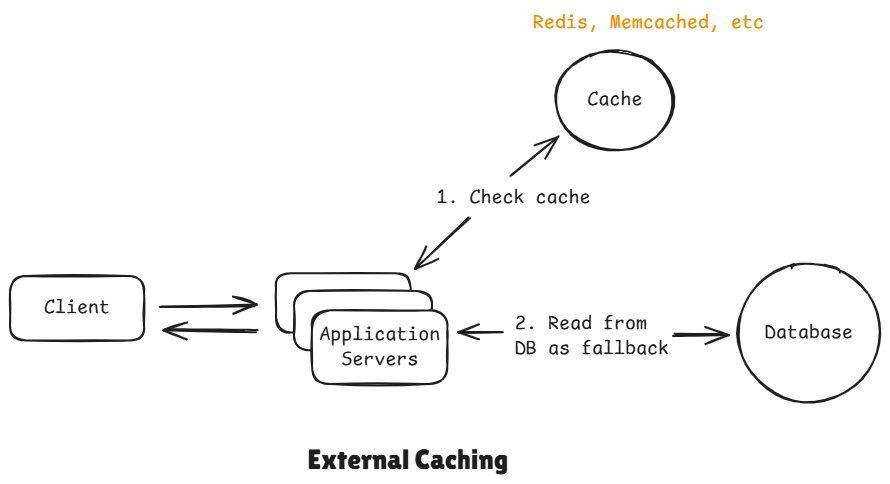
Flow:
When application needs data, it first checks the cache. If the data is found there, that's a cache hit and it returns the data instantly. If it's not there we call that a cache miss and it has to fallback to the database, fetch the data and it stores a copy of that data back in the cache and returns it back to the client.
Purpose:
- Shared consistency across instances
- All application servers can share the same external cache.
- High availability
- Offload DB load
Limitations:
- Network latency
2 In-Process Caching
It let's us skip the complexity of adding redis entirely. As a matter of fact modern day servers runs on really big machines nowadays that have plenty of memory and we can use some of that memory in order to cache data right inside of the process. It is by far the fastest kind of caching. We don't have expensive network calls. The data is already sitting in the same memory space as of our application.
Of course this comes with trade-offs, and the main trade-off is unlike the external cache, each application server has its own in-process memory. This means if one server caches something, the others won't see it. So we end up with these inconsistencies or even wasted memory if we are not too careful.
- No global visibility
- Scaling problem (horizontal scaling breaks cache usefulness)
- Cache eviction issues
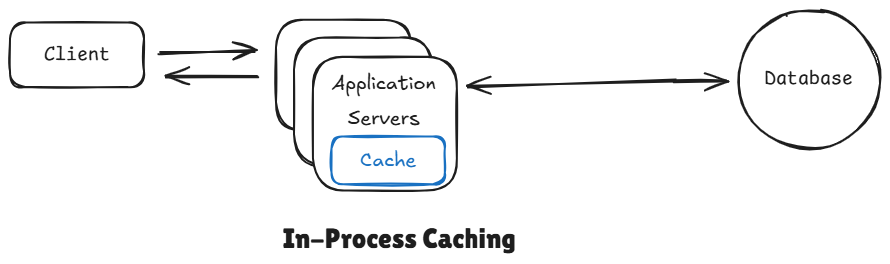
Advantages
- Fastest backend cache
- No network calls
Trade-off
- Each server has its own cache
- No sharing -> inconsistency
- Memory limitations
3 CDN / Edge Cache
Imagine a user request an image.
Instead of traveling to the server, the request goes to a neaby edge server.
This is where CDNs like:
- Cloudflare
- Akamai
- Fastly
Comes into play.
CDN is a geographically distributed network of servers that can cache content closer to your users.
We are optimizing for network latency. Without CDN, every single request has to travel all the way to your origin server. If you had a server in US, and your user is in Haryana (India), then this round trip of request could take times in 300 milliseconds, which is huge.
With CDN, the same request might hit an edge server that's just a few miles away, which make take up to 20 to 40 milliseconds roundtrip, which is a huge difference.
The way it works is that when a user requests something like an image, that request goes to the nearest CDN edge server, if image is already cached there, it's returned immediately. That's the cache hit case. If not, if it's a cache miss then CDN itself goes and fetches that ,media or whatever you are looking for, from your origin server, and then it's return back to CDN. The CDN will then cache it so that it has it for next time and return it back to client.
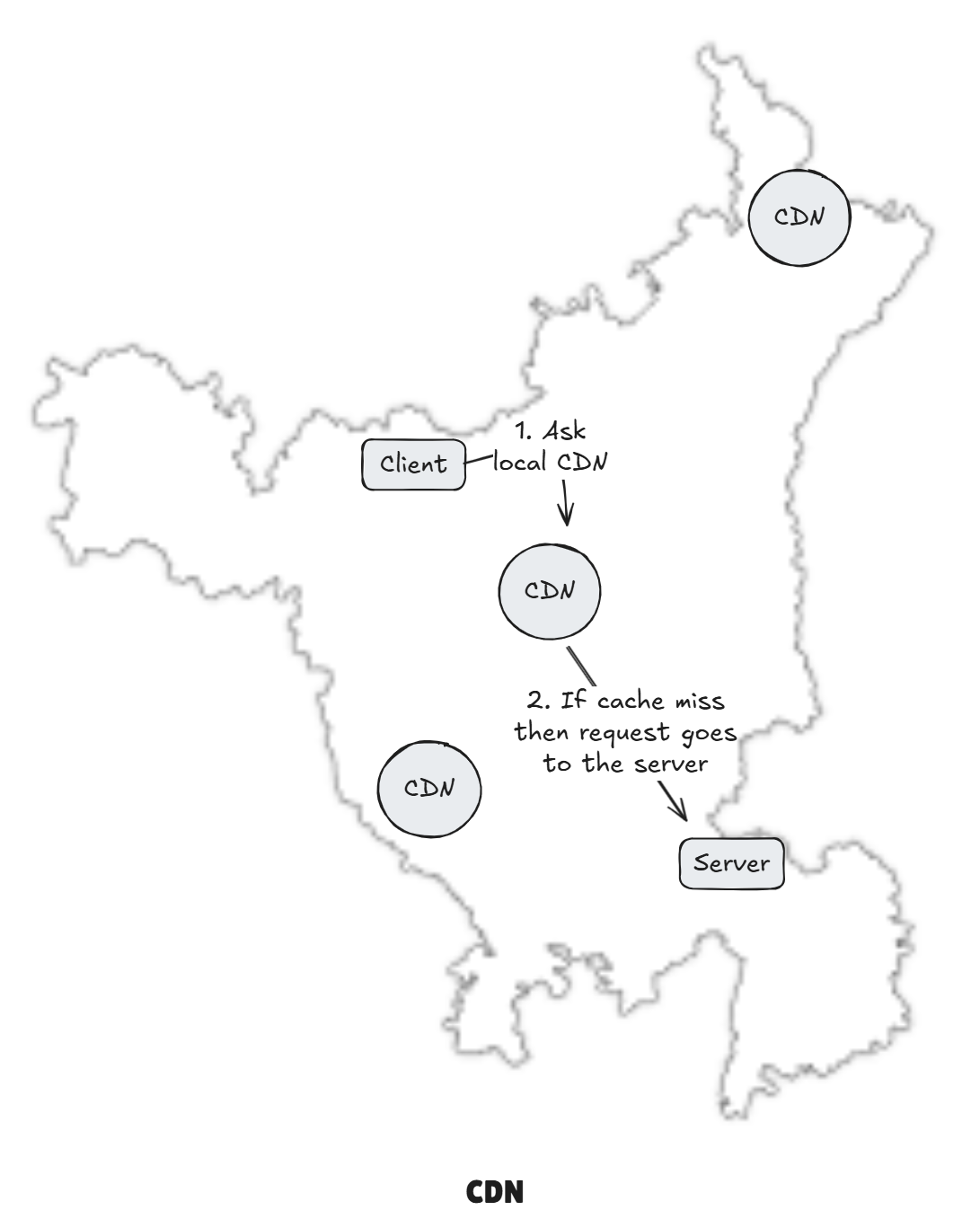
Caches:
- Static assets
- Public GET APIs
- Images, videos
Purpose:
- Absorb massive global traffic
- DDoS protection
- Reduce backend load
- Reduce latency globally
Limitations:
- Eventual consistency
- Invalidation complexity
4 Client-Side Caching
This is when data is stored directly on user's device, either in the browser or the app, which avoid unnecessary network calls. In web apps, that might be something like the HTTP cache, or local storage within the browser itself. For mobile apps, native mobile apps, this could be data kept in memory or even written to the local disk of device. It's super fast, that data never leaves the device but it comes with a downside that you have less control over it. Data can go stale, validation, freshness, all of that is a bit harder.
This is the first and fastest layer closest to the user.
Data is stored directly to the user's device:
- Browser cache
- LocalStorage / IndexedDB
- Mobile app storage
A user open the app again – no network call is needed.
The data is already there.
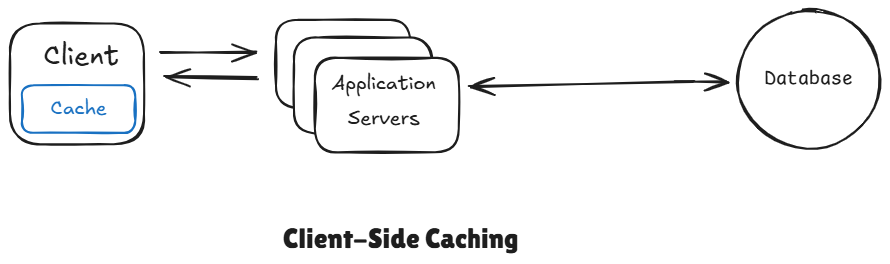
Purpose:
- Eliminate network calls (reduced)
- Offline support
- Zero latency
Caches:
- API responses
- Images, JS, CSS
- User profile, settings
Controlled via:
Cache-Control,ETag- Service Workers
- LocalStorage, IndexedDB
Limitations:
- Hard to globally invalidate
- Security risk if used improperly
- Data can become stale
5 Database Buffer Cache
Even the database isn't naive – it caches too.
It lives inside the database engine itself. Instead of reading from disk every time, DB keeps hot data in memory.
Caches:
- Disk pages
- Index blocks
- Query results
Purpose:
- Reduce disk IO
- Speed up repeated DB access
Limitations:
- Does NOT reduce DB CPU load
- No application control
Quick Decision Table
| Cache Type | Latency | Shared | Consistency | Best Use Case |
|---|---|---|---|---|
| Client Cache | ⚡ Fastest | ❌ | ❌ | UI, offline |
| CDN | ⚡ Very fast | ✅ | ❌ (eventual) | Static assets |
| In-Process | ⚡ Fast | ❌ | ❌ | Hot data |
| Redis (External) | ⚡ Fast | ✅ | ⚠️ Depends | DB offload |
| DB Buffer | ⚡ Medium | ✅ | ✅ | Disk I/O |
The closer the cache is to the user, the faster it is – but the weaker the consistency becomes.
The closer it is to the database, the stronger the consistency – but the higher the latency becomes.
Closer to user → Lower latency, weaker consistency
Closer to database → Higher latency, stronger consistency
Cache Architecture
Cache architecture = how cache layers are structured, connected, and kept consistent with the system.
It answers:
- Where is the cache placed?
- Is it shared or local?
- How does it sync with DB?
- How many levels exist?
- How does it scale?
1 Cache-Aside (Lazy Loading)
Cache-aside is the default choice because it gives full control to the application and fails safely.
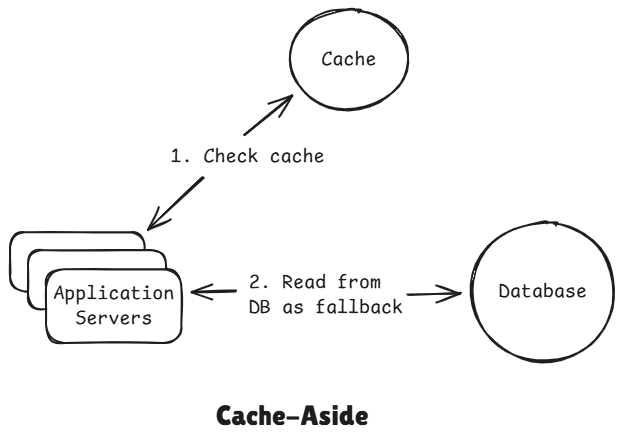
Flow:
- App checks cache
- If present -> return immediately
- If miss -> fetch from DB
- Store in cache
- Return to client
Client
 │
 ▼
Application
 │
 ├── Check Cache
 │       │
 │       ├─ Hit → return
 │       │
 │       └─ Miss
 │            │
 │            ▼
 │        Query DB
 │            │
 │            ▼
 │        Update Cache
 │
 ▼
Return Response
Used In:
- Almost every backend system
- Microservices
- E-commerce
- Feeds
- Profiles
Advantages
- Simple to implement
- App controls cache
- Works with any DB
- Fault-tolerant (cache can fail safely)
Disadvantages
- Cache miss penalty, for every new data there will always be cache-miss, can be solved using
preheating the cache. - Stampede risk
- Temporary inconsistent on writes
2 Read-Through Cache
Here cache handles the database lookup instead of the application. So on a cache miss whereas before the application server went and read from the database and updated the cache and returned the value. Now the cache itself is going to do that. So we try to read from the cache if we miss, the cache goes and request the data from the database stores it in the cache and returns it back to the application server. You can think it like a cache aside but with the cache acting as a proxy.
The application never queries the database directly, the cache itself fetches data from the database.
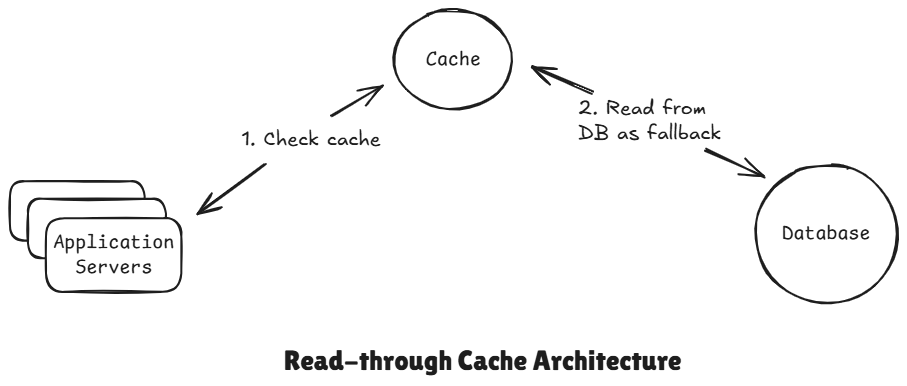
Flow:
- Read through cache
- If found cache hit, return the data
- Cache miss, cache's internal library will automatically fetch the data from DB, and put it in cache and return to the client.
Client
   │
   ▼
Application
   │
   ▼
Read-Through Cache
   │
   ▼
Database
The application never directly queries the database.
Used In:
- Managed cache services
- Simple architectures
- Cloud-native platforms
Advantages:
- Client don't need to bother about DB logic.
- Centralized logic
Disadvantages:
- Cache miss whose solution is again preheating the cache.
- Less control
- Cache becomes tightly coupled to DB
3 Write-Through Cache
The application writes directly the cache first and then the cache synchronously writes that data to the database before it returns to the user and the write isn't considered until both the cache and the database have been updated.
In this strategy every write operations updates both the cache and the database at the same time.
In practice you need a library or a framework for the part that support this behaviour, something that knows to trigger your database write logic automatically because tools like Redis or Memcache, they don't natively support this. So you need to either handle this logic yourself in your application code by writing to both at the same time or you will want to use a library something like Spring Cache which can automatically do that right for you.
But the trade-off here is that you have slower writes because you need to wait for both of operation to happen and then also you pollute your cache with all this data that may never be read again. If we write everything to our cache, then it might be data that nobody every actually accesses and we are just bloating our cache for no reason.
It also suffer from dual write problem. This would be that if the cache update succeeds but the database write fails or vice versa then the two enter an inconsistent state and so you would need a retry logic to handle all of this to deal with this but in a distributed system this perfect consistency is incredibly hard to achieve.
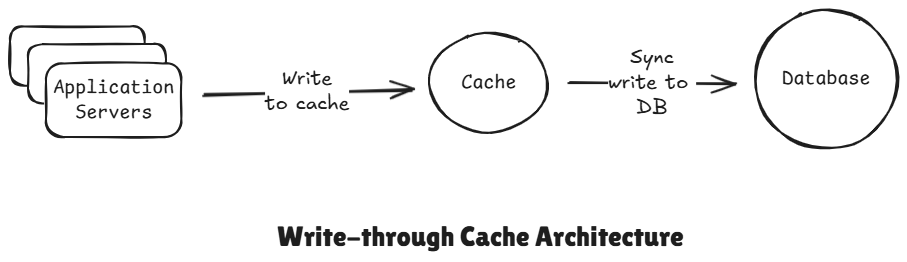
Flow:
- Write -> cache -> DB
- Read -> cache
Used In:
We only use it when reads must always return the fresh data and when system can tolerate some slightly slower writes.
- Financial ledgers
- Critical read-after-write systems
Advantages:
- Strong consistency
- No stale data
Disadvantages:
Higher write latency, so it is slow
Write latency = Cache write + DB write- Cache failure blocks writes
4 Write-behind Cache (Write-back)
It really similar to write-through, but instead of updating the database synchronously, the cache writes to the database asynchronously in the background, and so the application only writes to the cache, just like we did for write-through, but then the cache flushes those updates to the database, usually in baches later on. So, this makes writes much faster than write-through.
But it introduces new risk, if the cache were to crash or fail before their flush, then we would have data loss. We use only when high write throughput is more important than immediate consistency or close to immediate consistency. So for example, something like analytics where occasional data loss might be acceptable.
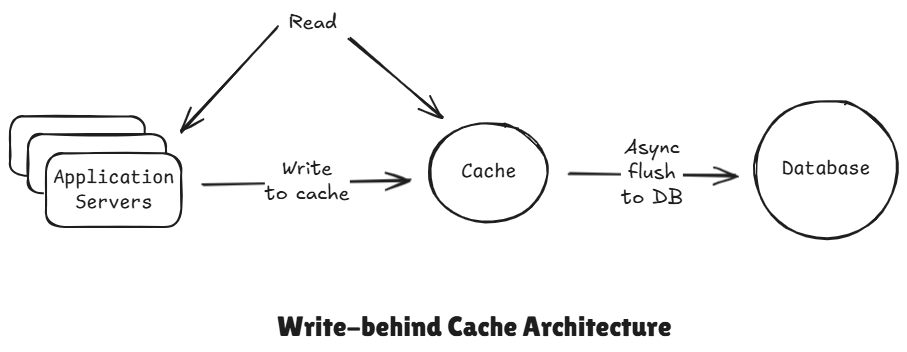
Flow:
- Writes goes to cache
- DB updated asynchronously
Used In:
- Logging systems
- Analytics pipelines
- Gaming leaderboards
Advantages:
- Ultra-fast writes
- Smooth traffic spikes
Disadvantages:
- Data loss risk
- Inconsistency in data
5 Write Around Caching
In this strategy write operations go directly to the database, bypassing the cache, while read operations still use the cache.
Core Idea:
In write-around caching:
- Writes -> Database directly, and marks that data in cache as dirty
- Reads -> Cache first
The cache is not updated during writes.
Instead, the cache gets updated only when a read occurs later.
Advantages:
- Without using any 2 phase locking, it can maintain consistency.
Disadvantages:
- first read is slow

Join the discussion
Sign in with your account to post comments, reply to others, and participate in the conversation.
Login to Comment