


What is a Class Diagram?
A Class Diagram is a staticstructural diagram in UML (Unified Modeling Language) that visually represents the classes, attributes, operations (methods), and relationships among objects in an object-oriented system.
- Classes (blueprint for objects)
- Attributes (data/properties)
- Methods (functions/behavior)
- Relationships between classes (e.g., inheritance, associations)
It shows:
Classes

Interfaces

Attributes

Methods

Relationships
It is primarily used in the design phase of software development.
Purpose of Class Diagram
- To describe the blueprint of a system’s design
- To communicate design between teams
- To define object types, data, and behavior
- To specify relationships such as inheritance, associations, and dependencies
- To reverse engineer code into visual form
- To act as a guide for developers, testers, and architects
Anatomy of a UML Class
A UML class consists of three sections.
Structure:
+----------------------+
| Class Name           |
+----------------------+
| Attributes           |
+----------------------+
| Methods              |
+----------------------+
Example:
+----------------------+
| Customer             |
+----------------------+
| name : string        |
| email : string       |
+----------------------+
| placeOrder()         |
| updateProfile()      |
+----------------------+
Equivalent C++ Code:
class Customer
{
private:
    string name;
    string email;

public:
    void placeOrder();
    void updateProfile();
};
Class Name Compartment
Top section:
+----------------------+
| Customer             |
+----------------------+

Represents:
	Class Name
Usually singular.
Good:
Customer
Order
Product
Bad:
Customers
Orders
Products
because classes represent a single entity.
Attibute Compartment
Middle section:
+----------------------+
| name : string        |
| email : string       |
+----------------------+
Format:
attibuteName: TypeExamples:
name : string
age : int
price : double
status : OrderStatus
Equivalent C++:
string name;
int age;
double price;
Method Compartment
Bottom section:
+----------------------+
| placeOrder()         |
| cancelOrder()        |
+----------------------+
Format:
methodName()Examples:
calculateTotal()
withdraw()
deposit()
pay()
Equivalent C++:
void placeOrder();
void cancelOrder();
Visibility
Class diagrams support visibility modifiers.
Public:
	Symbol = +
Example: + placeOrder()
Equivalent: public:
Private:
Symbol = -
Example: - password
Equivalent: private:Protected:
Symbol = #
Example: # validate()
Equivalent: protected:Package/Internal
Symbol: ~
Less common in C++.Example:
+----------------------+
| Customer             |
+----------------------+
| - name : string      |
| - email : string     |
+----------------------+
| + placeOrder()       |
| + updateProfile()    |
+----------------------+
Full Example:
+--------------------------------+
| Customer                       |
+--------------------------------+
| - name : string                |
| - email : string               |
| - phone : string               |
+--------------------------------+
| + placeOrder()                 |
| + cancelOrder()                |
| + updateProfile()              |
+--------------------------------+
Equivalent in Class Diagrams
class Customer
{
private:
    string name;
    string email;
    string phone;

public:
    void placeOrder();
    void cancelOrder();
    void updateProfile();
};
Components of a Class Diagram
1️⃣ Class Structure
1 Class:
Represented by a rectangle divided into three compartments:
- Top Compartment: Class name bold and centered (e.g.,
Person) - Middle Compartment: Attributes (data members) (e.g.,
-name: string) - Bottom Compartment: Methods (functions/operations)
+getName(): string)
+----------------------+
|      Person          | <- Top Compartment
+----------------------+
| -name: string        | <- Middle Compartment
| -age: int            |
+----------------------+
| +getName(): string   | <- Bottom Compartment
| +setAge(a: int): void|
+----------------------+
Attributes
- Represent internal state/data members of the class
- Syntax:
visibility name: type = default
Methods
- Represent behavior or functionality
- Syntax:
visibility name (parameters): returnType
2 Visibility (Access Modifiers)
Visibility markers define access levels for attributes and operations.
| Symbol | Visibility | Example |
| + | Public | +getBalance() |
| - | Private | -accountId |
| # | Protected | #interestRate |
| ~ | Package | ~internalRef |
| / | derived |
These markers help enforce encapsulation, a core principle in object-oriented design.
3 Abstract Classes and Methods
An Abstract class is a class that cannot be instantiated and may contain both implemented and unimplemented (abstract) methods. It is represented in UML class diagram as follows:
- Class name in
italicsor{abstract}stereotype. - Abstract methods are listed without implementation.
Consider the below code:
class AbstractAccound {
    void calculateInterest() = 0;
}
The above code looks like the below UML diagram.
+------------------------------+
|    <<abstract>>              |
|    *AbstractAccount*         |
|------------------------------|
| +calculateInterest() : void  |
|                              |
+------------------------------+
4 Static Members
- Underlined e.g.,
+count: int(underlined)
5 Interfaces
An interface defines a contract that other classes must follow. It contains only abstract methods (no implementation). The derived class must implement these methods.
It defines the “what”, while classes provide the “how”.
UML class diagram for interfaces contains the following compartments:
- Name Compartment: Contains the stereotype
<<interface>>and the name of interface. - Operation Compartment: Contains method signatures (i.e., abstract operations to be implemented).Only method declaration (no attributes).
For example, consider the following interface that can be represented as the diagram given below:
class Notifier {
	void sendAlert(string) = 0;
};
+------------------------------------+
| <<interface>> | <-- Name compartment
| Notifier |
|------------------------------------|
| |
|------------------------------------|
| +sendAlert(message: String): void | <-- Operation compartment
| |
+------------------------------------+Note:
By default, interfaces don't have a compartment for attributes like regular classes. However, there is an exception, i.e., If the interface declares constants, you may include an attribute compartment to show them.
6 Enumeration (Enum)
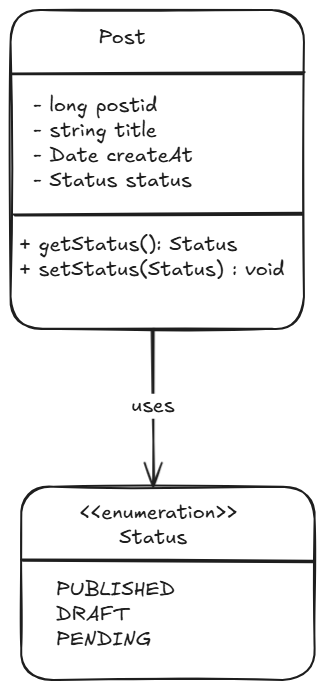
An enumeration is a data type consisting of a fixed set of named values, often called literals. Unlike strings or integers, enums are type-safe, meaning the compiler ensures you can only use values that actually exist in your defined set.
It is represented in UML class diagrams with the <<enumeration>> stereotype above the name in one compartment and list of literals in another compartment.
+-----------------------+
|   <<enumeration>>     |
|     Name              |
+-----------------------+
|   literal 1           |
|   literal 2           |
|   literal 3           |
+-----------------------+
If a value can only be one of a predefined set of options, consider using an enum.
Why Use Enums?
Suppose you have to represent the post's status. You would represent it as the string throughout your codebase:
string status = "PUBLISHED";

// Somewhere else in the codebase
if (status == "PBLISHED") { // Typo, the condition is never true
	SendNewsletter();
}
This code compiles without any warnings. The Typo “PBLISHED” is a perfectly valid string as far as the compiler is concerned. The bug only surfaces when someone complaints they are not receiving the newsletter of published posts.
Enums eliminate this entire category of bugs. When you define status as an enum with values like PUBLISHED, DRAFT, PENDING, the compiler knows exactly which value is valid.
2️⃣ Relationships
In object-oriented design, classes often need to interact with one another. Just like in the real world (e.g., Driver drives a Car), We model relationship between classes to represent these interactions.
2.1 Association (Use-a)
Definition: A general relationship between two classes (e.g., “uses" or “has”).
Meaning:
Knows About
Uses
Connected To
Association means:
One object knows about another object.
Imagine:
- A
Teacherteaches aCourse - A
Studentenrols in aCourse
This connection is called Association.
UML Notation: A solid line between the two classes.
Example: Customer places Order
Diagram:
	Customer -------- Order

Simple line.

Meaning:
	Customer and Order are related.
class Order;
class Customer
{
private:
vector<Order*> orders;
};Direction of Association:
- Bidirectional (default)
Both classes know about each other
A -------- B
- Unidirectional
Arrow shows that one class knows about the other
A --------> BExample:
Studentknows aboutCourse, but not vice versa.Customer -------> Order Customer knows Order
Multiplicity: It defines cardinality.
How many objects participate?
Example:
Customer ---- Order

Question: How many Orders?

One Customer Many Orders

Diagram:
	Customer 1 ------ * Order
Meaning: One customer can have many orders.1(exactly one)0..1(zero or one)*or0..*(many)1..*(at least one)
Common Multiplicities:
| Symbol | Meaning |
|---|---|
| 1 | Exactly One |
| 0..1 | Optional |
| * | Many |
| 0..* | Zero or Many |
| 1..* | One or Many |
Examples:
Customer and Orders
Customer 1 ----- * OrderOrder and Payment
Order 1 ----- 1 PaymentOrder and Coupon
Order 0..1 ----- Coupon

Coupon optional.
Types of Association
1 Simple Association (General Association)
A general binary relationship between two classes, indicating they are connected in some way.
Characteristics:
- No ownership implied
- Can be unidirectional or bidirectional
- Uses a solid line
Customer ---------> Order
A Customer places an Order.
2 Inheritance (Generalization)
Also called Generalization, this represents an “is-a” relationship between a subclass and a superclass. Example: A Dog is an Animal.
UML Notation: A solid line with a hollow triangle pointing to the parent class.
Characteristics:
- Denotes class hierarchy
- Represented by a solid line with a hollow triangle pointing to the superclass
- Subclass inherits attributes and behaviors from the superclass.
      Animal
         ^
         |
   ----------------
   |              |
 Dog            Cat
Example:
SavingsAccount ───▷ BankAccount
SavingsAccountis-aBankAccount.
3 Aggregation (Weak “has-a”) (Weak Ownership)
- Part-whole relationship where parts can exist independently
- Represented with a hollow diamond (◇) at the aggregate (whole) end
- Loosely coupled
- Lifetime of the part is independent
Example: University contains Departments.
University ◇—— Department(A university has departments, but departments can exist alone.)
Team ◇-------- Player
A Team has multiple Players, but a Player can exist without a Team.
Code:
class Player { };

class Team {
    vector<Player*> players;  // Aggregation
};
4 Composition (Strong “has-a”) (Strong Ownership)
A stronger form of aggregation indicating exclusive ownership. The part cannot exist without the whole.
Characteristics:
- Represented by a filled diamond (◆) at the composite (whole) end
- Strong coupling
- When the whole is destroyed, parts are destroyed too
Example: A House is composed of Rooms.
House ◆—— RoomA House consists of Rooms, and rooms don't exist without a house.
Code:
class Room { };

class House {
    Room livingRoom;  // Composition
};
5 Realization (implementation)
Realization is the relationship between a class and an interface. The class agrees to implement the behavior declared by the interface or abstract class.
Real-World Analogy:
A TV remote (interface) defines how to press buttons.
A SamsungRemote (class) provides the actual behavior for those buttons.
- It's a contract: the class agrees to provide actual implementations.
- Common with interfaces or abstract base classes.
UML Symbol:
A dashed line with a hollow triangle pointing to the interface.
Example:
class Remote {  // Interface
public:
    virtual void turnOn() = 0;
};

class SamsungRemote : public Remote {
public:
    void turnOn() override {
        // Actual implementation
    }
};
5 Dependency
A class uses another class temporarily to perform a task.
Definition:
Dependency means:
Temporary usage relationship.
Example:
OrderService -----> PaymentGateway

OrderService uses PaymentGateway
Does not own it.
Real-World Analogy:
A Doctor uses a Stethoscope during a check-up, but doesn't own it forever.
- It is temporary or one-time use relationship.
- No strong ownership.
- Often seen in method parameters or local variables.
Example:
class Stethoscope {};

class Doctor {
public:
    void checkPatient(Stethoscope s) { // Dependency
        // Uses Stethoscope temporarily
    }
};
UML Symbol:
- A dashed arrow pointing from the dependent class to the class it uses.

Join the discussion
Sign in with your account to post comments, reply to others, and participate in the conversation.
Login to Comment